
आज के समय में एक strong profile image आपकी personal branding को पूरी तरह बदल सकती है। चाहे आप Blogger हों, YouTuber, Student या Professional — एक clean और confident studio portrait आपकी personality को अलग level पर ले जाता है।
अच्छी बात यह है कि अब आपको DSLR कैमरा या महंगा स्टूडियो सेटअप की जरूरत नहीं है। सही Prompt की मदद से आप ChatGPT के Image Tool से ही एक ultra realistic, professional quality “Cool Boy” स्टाइल पोर्ट्रेट बना सकते हैं।
लेकिन ध्यान रखिए —
AI से शानदार फोटो निकलवाने का असली राज है सही और structured prompt।
🎯 हम कैसी Image बनाएंगे?
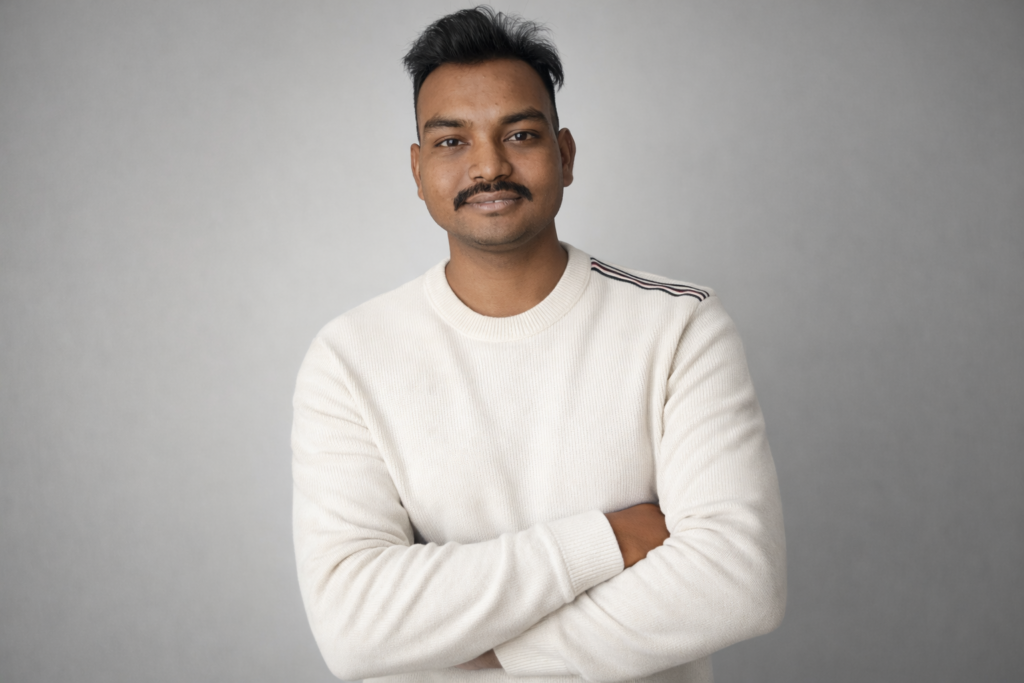
इस गाइड में जो image बनेगी उसमें ये features होंगे:
- Late 20s का handsome Indian look
- ऊपर की तरफ सेट किए हुए घने काले बाल
- हल्की और natural stubble beard
- Natural skin texture (plastic जैसा नहीं)
- Soft confident smile
- Off-white sweater
- Smooth light grey studio background
- Soft diffused lighting
- DSLR 85mm lens photography feel
- 4K high resolution quality
यह image LinkedIn, Instagram, Portfolio या personal branding के लिए बिल्कुल perfect रहेगी।
🔴 Prompt in English 👇
Ultra realistic studio portrait of a handsome Indian man in his late 20s, clean hairstyle with thick black hair styled upward, light stubble beard, natural skin texture, soft confident smile, wearing a fitted off-white crew neck sweater, minimal fashion stripe detail on shoulder, standing against a smooth light grey studio background, soft diffused lighting, professional photography, sharp focus, shallow depth of field, DSLR camera quality, 85mm lens, cinematic look, high resolution, 4K, natural color tones.
🔴 Prompt in Hindi 👇
अल्ट्रा रियलिस्टिक स्टूडियो पोर्ट्रेट एक आकर्षक भारतीय युवक (लगभग 28 वर्ष), घने काले बाल ऊपर की ओर स्टाइल किए हुए, हल्की और प्राकृतिक दाढ़ी, त्वचा की वास्तविक बनावट (प्राकृतिक पोर्स के साथ), हल्की आत्मविश्वासी मुस्कान, ऑफ-व्हाइट फिटेड स्वेटर पहने हुए, कंधे पर हल्की फैशन स्ट्राइप डिटेल, स्मूथ हल्के ग्रे रंग की स्टूडियो पृष्ठभूमि, सॉफ्ट डिफ्यूज लाइटिंग, प्रोफेशनल डीएसएलआर फोटोग्राफी स्टाइल, तेज फोकस, शैलो डेप्थ ऑफ फील्ड, 85mm पोर्ट्रेट लेंस प्रभाव, सिनेमैटिक लेकिन प्राकृतिक रंग टोन, उच्च रेजोल्यूशन, 4K गुणवत्ता, बिना भारी फिल्टर और बिना आर्टिफिशियल स्किन स्मूदिंग।
📌 Prompt को कैसे Use करें?
Step 1:
ChatGPT में Image Generation Mode खोलें।
Step 2:
ऊपर दिया गया prompt कॉपी करें।
Step 3:
Prompt पेस्ट करके Generate बटन दबाएं।
Step 4 (अगर अपनी फोटो के साथ बनाना चाहते हैं):
- अपनी साफ और सामने से ली गई फोटो अपलोड करें।
- Prompt में जोड़ें:
“reference image के अनुसार चेहरा और स्किन टोन समान रखें”
🔥 Expert Tips – Result और Realistic कैसे बनाएं?
✔ “Natural skin texture” जरूर लिखें
✔ “85mm lens” लिखने से DSLR portrait feel आता है
✔ “Soft diffused lighting” realistic studio look देता है
✔ “No heavy filters” जोड़ने से over editing नहीं होगी
अगर आप और premium look चाहते हैं तो अंत में जोड़ सकते हैं:
professional headshot photography, ultra HD clarity, natural shadow balance
❌ Common Mistakes जो लोग करते हैं
❌ सिर्फ “cool boy photo” लिख देना
❌ Lighting का जिक्र न करना
❌ Background clear न बताना
❌ Quality mention न करना
AI उतना ही अच्छा काम करेगा जितनी clarity आप देंगे।
🎬 Final Output कैसा दिखेगा
आपको मिलेगा:
- Clean professional look
- Natural skin tone
- Cool confident expression
- DSLR quality portrait
- Social media ready image
यह style आज के समय में personal branding के लिए सबसे ज्यादा trending है।
Conclusion
AI image generation में सफलता का सबसे बड़ा मंत्र है —
Structured और detailed prompt writing।
अगर आप subject + lighting + camera + texture सभी चीजें स्पष्ट लिखेंगे, तो AI भी आपको professional level का परिणाम देगा।
Practice करते रहें, prompt को refine करते रहें — और हर बार बेहतर image पाएंगे।