
आज के समय में professional studio look वाली photo personal branding के लिए बहुत जरूरी हो चुकी है।
लेकिन सबसे बड़ी समस्या क्या होती है?
👉 AI face बदल देता है।
👉 Identity change हो जाती है।
👉 Over-beautify कर देता है।
अगर आप अपनी exact face identity maintain रखते हुए high-end fashion magazine style portrait बनाना चाहते हैं, तो आपको सही structured prompt लिखना जरूरी है।
इस guide में हम सीखेंगे कि Gemini का use करके same face high-end fashion portrait कैसे बनाएं — बिना face change हुए।
🎯 हम कैसी Image बनाएंगे?
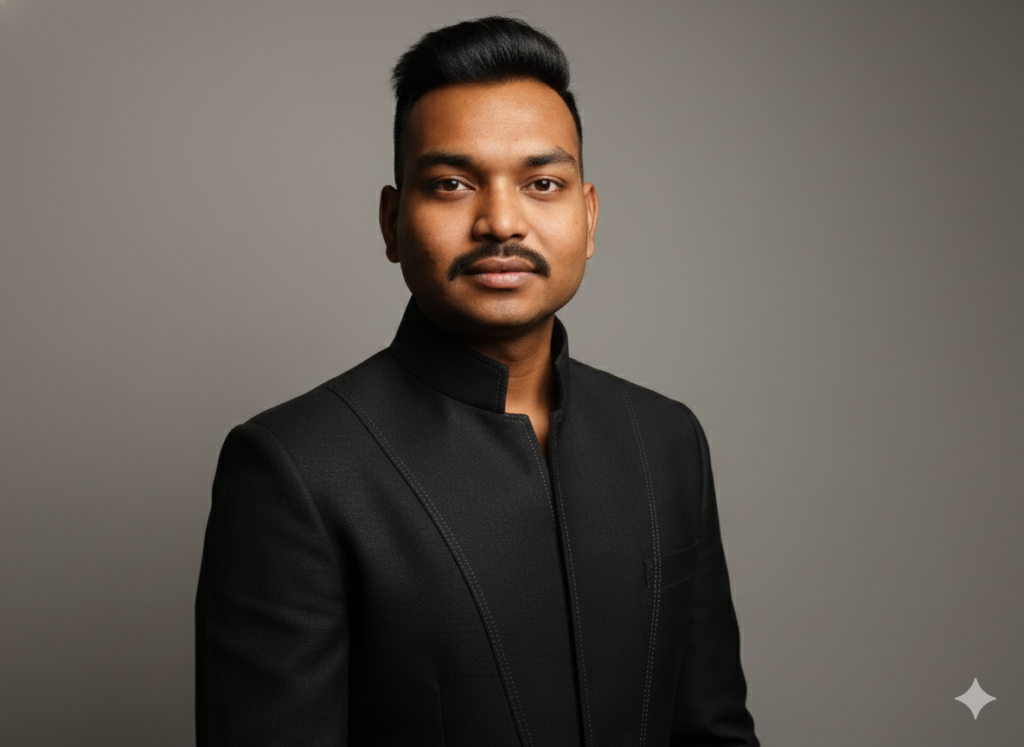
इस guide में बनने वाली image में ये features होंगे:
- Exact same face structure (कोई बदलाव नहीं)
- Natural skin texture (visible pores)
- No beautification
- Same hairline & same facial proportions
- Dark stylish high collar jacket
- Smooth grey studio background
- Dramatic soft studio lighting
- DSLR 85mm portrait lens feel
- Ultra high resolution fashion photoshoot look
यह image LinkedIn, Instagram, Portfolio और premium branding के लिए perfect रहेगी।
🔴 Prompt in English👇
Ultra realistic high-end fashion studio portrait of the exact same person from the uploaded reference image. Maintain 100% identical face structure, facial proportions, jawline shape, nose shape, lip shape, eye shape, eyebrow thickness, skin tone, forehead size, ear shape and overall head geometry. Do NOT beautify, do NOT modify facial structure, do NOT change identity.
Keep natural skin texture with real pores, no plastic smoothing, no face reshaping, no symmetry correction, no AI beautification. Hairline must remain exactly the same as reference image. Hairstyle can be neatly styled backward but density, thickness and hairline must remain unchanged.
Expression: confident but natural, not aggressive, lips relaxed.
Outfit: dark stylish high collar jacket with subtle stitching details, slightly open shirt inside.
🔴 Prompt in Hindi👇
अल्ट्रा रियलिस्टिक हाई-एंड फैशन स्टूडियो पोर्ट्रेट, अपलोड की गई संदर्भ फोटो वाले बिल्कुल उसी व्यक्ति का। चेहरे की संरचना, चेहरे का अनुपात, जबड़े का आकार, नाक का आकार, होंठों का आकार, आंखों का आकार, भौंहों की मोटाई, त्वचा का रंग, माथे का आकार, कानों का आकार और पूरे सिर की ज्यामिति 100% समान रखें। चेहरे में कोई बदलाव न करें, कोई ब्यूटीफिकेशन न करें, पहचान बिल्कुल न बदलें।
त्वचा की प्राकृतिक बनावट (प्राकृतिक पोर्स के साथ) बनाए रखें। प्लास्टिक जैसा स्मूदिंग न करें। फेस रीशेपिंग, सिमेट्री करेक्शन या AI ब्यूटीफिकेशन बिल्कुल न करें। हेयरलाइन बिल्कुल संदर्भ फोटो जैसी ही रखें। बाल पीछे की ओर सलीके से स्टाइल किए जा सकते हैं लेकिन घनत्व, मोटाई और हेयरलाइन में कोई बदलाव न हो।
भाव: आत्मविश्वासी लेकिन प्राकृतिक, आक्रामक नहीं, होंठ सामान्य और रिलैक्स।
पहनावा: गहरे रंग की स्टाइलिश हाई कॉलर जैकेट, हल्की सिलाई डिटेल के साथ, अंदर हल्की खुली कॉलर शर्ट।
पृष्ठभूमि: स्मूथ न्यूट्रल ग्रे स्टूडियो बैकग्राउंड।
लाइटिंग: सामने और हल्के साइड से सॉफ्ट ड्रामेटिक लाइट, प्राकृतिक शैडो, ओवरएक्सपोजर नहीं।
कैमरा स्टाइल: डीएसएलआर गुणवत्ता, 85mm पोर्ट्रेट लेंस प्रभाव, शैलो डेप्थ ऑफ फील्ड, अल्ट्रा हाई रेजोल्यूशन, प्रोफेशनल फैशन मैगज़ीन स्टाइल।
कलर ग्रेडिंग प्राकृतिक हो, भारी सिनेमैटिक फिल्टर न हो।
📌 Gemini में Prompt कैसे Use करें?
Step 1:
Gemini खोलें और Image Generation option चुनें।
Step 2:
अपनी साफ, सामने से ली गई फोटो upload करें।
Step 3:
ऊपर दिया गया English prompt paste करें।
Step 4:
अगर Gemini face modify कर रहा है, तो ये लाइन ऊपर add करें:
Strictly preserve identity. Do not reinterpret the face. Do not stylize facial structure.
Step 5:
Generate करें।
🔥 Expert Tips – Face Change रोकने के लिए
✔ “Maintain 100% identical face structure” जरूर लिखें
✔ “Do not beautify” लिखना जरूरी है
✔ “No face reshaping” add करें
✔ “Natural skin texture with pores” लिखें
✔ Hairstyle change लिखते समय hairline unchanged जरूर mention करें
❌ Common Mistakes
❌ सिर्फ “same face” लिख देना
❌ Lighting mention न करना
❌ Camera style न लिखना
❌ Identity preservation clearly न बताना
❌ Over cinematic look लिख देना
AI clarity के अनुसार काम करता है।
🎬 Final Output कैसा मिलेगा?
आपको मिलेगा:
- Same real face
- Natural skin texture
- Premium fashion look
- Magazine style portrait
- Professional studio feel
- Social media ready image
Conclusion
Gemini से same identity realistic portrait निकालने का असली राज है:
👉 Detailed identity preservation instructions
👉 Lighting + Camera clarity
👉 No beautification instruction
👉 Structured professional prompt
Practice करें, prompt refine करें — और हर बार बेहतर result पाएंगे।