
कई लोग अपनी सोशल मीडिया प्रोफाइल के लिए एक ऐसा DP चाहते हैं जो स्टाइलिश भी लगे और बिल्कुल professional फोटो जैसा दिखे। AI image generation की मदद से अब यह काम बहुत आसान हो गया है। सही prompt लिखकर आप अपनी फोटो को cinematic और fashion portrait style में बदल सकते हैं।
लेकिन एक समस्या अक्सर आती है — AI image बनाते समय चेहरा बदल देता है। इसलिए अगर आप चाहते हैं कि image में आपका चेहरा बिल्कुल वही रहे, तो Face Lock prompt technique का उपयोग करना जरूरी होता है।
इस guide में हम सीखेंगे कि ChatGPT की मदद से stylish oversized outfit DP portrait कैसे बनाया जाता है।
🎯 हम कैसी Image बनाएंगे?
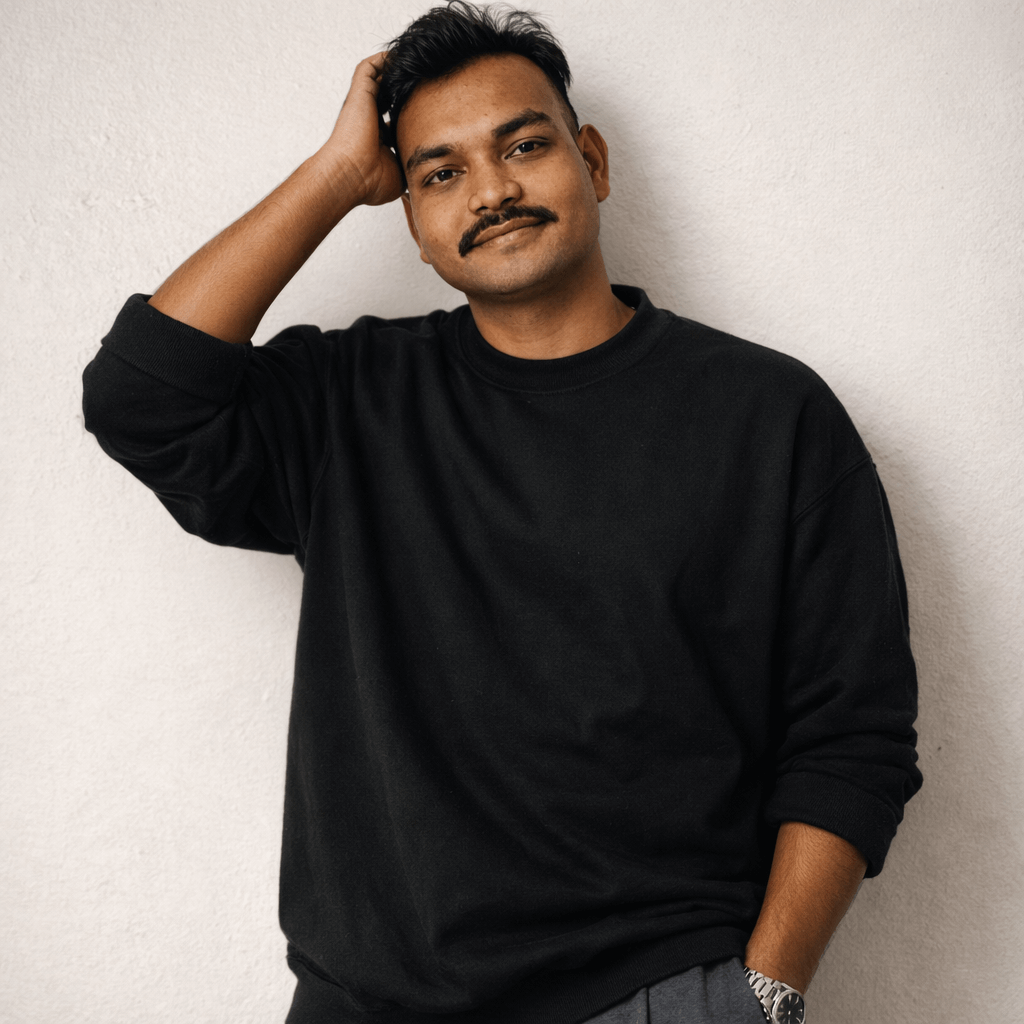
इस prompt से बनने वाली image में ये features होंगे:
- Same face identity lock portrait
- Clean minimalist background
- Stylish oversized outfit look
- Fashion editorial style portrait
- Relaxed confident pose
- Soft studio lighting
- Hyper detailed clothing textures
- High quality DP ready image
यह style Instagram DP, profile photos, fashion portraits और modern AI portraits के लिए बहुत popular है।
🔴Prompt in English 👇
(Use exact uploaded reference face, zero modification) FACE LOCK — ZERO MODIFICATION POLICY Face must remain 100% identical to the reference image. No beauty filters, preserve mustache and natural features. ASPECT RATIO: 1:1 square (Standard DP size) or 4:5 vertical portrait. (FACE LOCK POLICY) Waist-up composition of a young man with the exact reference face, leaning against a clean white textured wall. He is wearing an premium oversized jet black cotton sweatshirt with rolled-up sleeves and matching wide-leg grey joggers. Relaxed but confident smile, right hand subtly adjusting his hair. Studio lighting, soft and warm. Hyper-detailed fabric textures.
🔴Prompt in Hindi 👇
अपलोड की गई reference image के चेहरे को बिल्कुल वैसा ही रखें और उसमें किसी भी प्रकार का बदलाव न करें। चेहरे की बनावट, त्वचा की बनावट, मूंछ और प्राकृतिक facial features पूरी तरह सुरक्षित रहने चाहिए और किसी भी प्रकार का beauty filter या face smoothing इस्तेमाल नहीं होना चाहिए। यह image 1:1 square aspect ratio (DP size) या 4:5 vertical portrait format में बनाई जा सकती है। यह waist-up portrait composition है जिसमें वही reference face दिखाई देता है और व्यक्ति एक साफ सफेद textured दीवार के सहारे खड़ा है। उसने premium oversized jet black cotton sweatshirt पहना हुआ है जिसकी sleeves थोड़ी rolled-up हैं और नीचे wide-leg grey joggers पहने हुए हैं। उसके चेहरे पर relaxed और confident मुस्कान है और उसका दायाँ हाथ हल्के से अपने बालों को adjust करता हुआ दिखाई देता है। लाइटिंग soft और warm studio lighting है जो चेहरे और कपड़ों की texture को natural तरीके से highlight करती है। कपड़ों की fabric texture बहुत detailed और realistic दिखाई देती है।
📌 ChatGPT में Prompt कैसे Use करें?
Step 1
ChatGPT खोलें और Image Generation option चुनें।
Step 2
अपनी reference photo upload करें।
Step 3
ऊपर दिया गया prompt copy करके paste करें।
Step 4
Generate पर क्लिक करें और AI stylish DP portrait तैयार हो जाएगा।
अगर आप और cinematic result चाहते हैं तो prompt के अंत में यह भी जोड़ सकते हैं: ultra HD, fashion editorial lighting, cinematic portrait photography.
🔥 Expert Tips – Image को और Realistic कैसे बनाएं
✔ Face lock instructions जरूर लिखें
✔ Clothing texture detail में describe करें
✔ Soft studio lighting mention करें
✔ Background simple और clean रखें
✔ High resolution quality लिखें
❌ Common Mistakes जो लोग करते हैं
❌ Face identity instructions न लिखना
❌ Clothing detail describe न करना
❌ Lighting mention न करना
❌ Background describe न करना
❌ Prompt बहुत छोटा लिख देना
AI उतना ही अच्छा result देगा जितनी detail आप prompt में देंगे।
🎬 Final Output कैसा मिलेगा?
आपको मिलेगा:
- Same face stylish portrait
- Modern oversized fashion look
- Clean minimalist background
- Professional studio lighting
- Social media DP ready image
- Ultra realistic AI generated portrait
Conclusion
अगर आप ChatGPT की मदद से stylish profile portraits बनाना चाहते हैं तो structured prompt लिखना बहुत जरूरी है। जब आप face identity, clothing detail, lighting और background को सही तरीके से लिखते हैं तो AI एक ultra realistic modern fashion portrait generate करता है।