
Professional profile photos और corporate branding के लिए outdoor executive portraits आजकल काफी popular हो गए हैं। Golden hour lighting में ली गई photos natural, cinematic और premium look देती हैं। AI image generation tools की मदद से अब आप अपनी फोटो को high-end corporate outdoor portrait में बदल सकते हैं।
लेकिन एक common problem यह होती है कि AI image बनाते समय चेहरा बदल देता है। इसलिए अगर आप चाहते हैं कि image में आपका चेहरा बिल्कुल वही रहे, तो Face Lock prompt technique का उपयोग करना जरूरी होता है।
इस guide में हम सीखेंगे कि ChatGPT की मदद से golden hour executive portrait कैसे बनाया जाता है।
🎯 हम कैसी Image बनाएंगे?
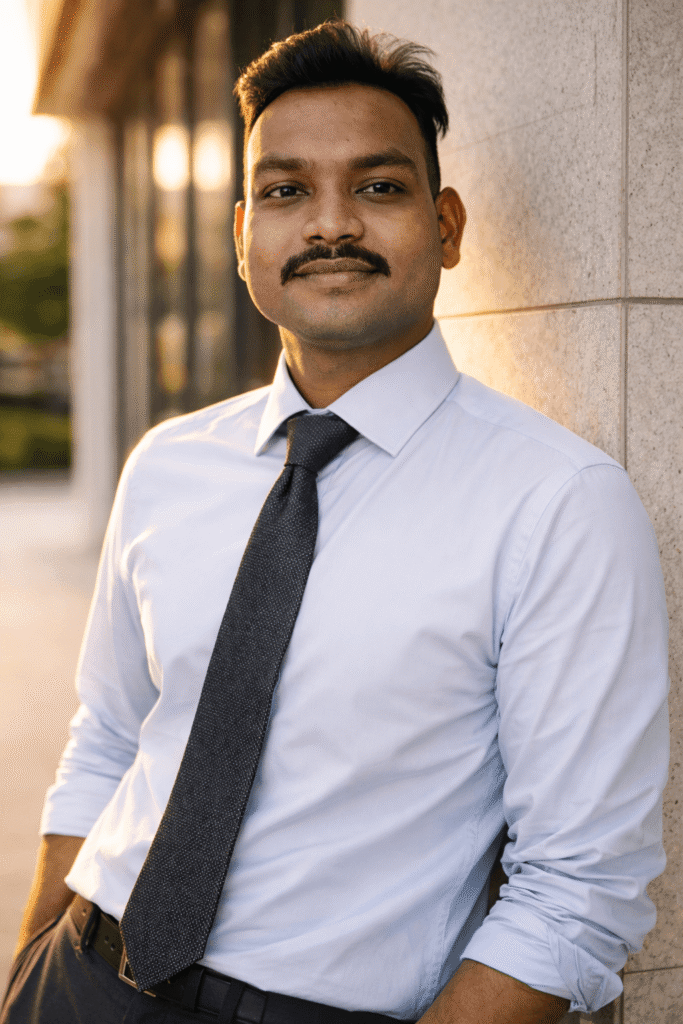
इस prompt से बनने वाली image में ये features होंगे:
- Same face identity lock portrait
- Professional corporate outdoor environment
- Golden hour cinematic lighting
- Modern corporate building background
- Formal business outfit
- Executive style confident pose
- Natural DSLR photography look
- Ultra realistic AI portrait
यह style LinkedIn profile photos, business branding और professional executive portraits के लिए बहुत popular है।
🔴Prompt in English 👇
(Use exact uploaded reference face, zero modification) FACE LOCK — ZERO MODIFICATION POLICY The Golden Hour Executive (Outdoor): (FACE LOCK POLICY) A professional outdoor portrait of the man with the exact reference face, leaning against a clean marble pillar of a modern corporate building. He is wearing a light blue formal shirt and a textured charcoal grey tie. Natural golden hour sunlight creating a rim-light effect on his shoulders. Sharp focus on face, shallow depth of field.
🔴Prompt in Hindi 👇
अपलोड की गई reference image के चेहरे को बिल्कुल वैसा ही रखें और उसमें किसी भी प्रकार का बदलाव न करें। चेहरे की बनावट, त्वचा की बनावट, स्किन पोर्स, मूंछ और चेहरे के प्राकृतिक features पूरी तरह सुरक्षित रहने चाहिए और किसी भी प्रकार का beauty filter या face reshaping नहीं होना चाहिए। यह एक professional outdoor corporate portrait है जिसमें वही reference face दिखाई देता है। व्यक्ति एक modern corporate building के marble pillar के सहारे खड़ा है। उसने light blue formal shirt पहनी है और साथ में textured charcoal grey tie पहनी हुई है। सूरज की golden hour रोशनी उसके कंधों और बालों के आसपास rim-light effect बनाती है जिससे image cinematic और premium दिखाई देती है। कैमरा का focus चेहरे पर sharp है जबकि background shallow depth of field के कारण हल्का blur दिखाई देता है जिससे professional DSLR portrait photography जैसा look बनता है।
📌 ChatGPT में Prompt कैसे Use करें?
Step 1
ChatGPT खोलें और Image Generation option चुनें।
Step 2
अपनी reference photo upload करें।
Step 3
ऊपर दिया गया prompt copy करके paste करें।
Step 4
Generate पर क्लिक करें और AI golden hour executive portrait तैयार हो जाएगा।
अगर आप और cinematic result चाहते हैं तो prompt के अंत में यह भी जोड़ सकते हैं: ultra HD, professional corporate portrait, golden hour photography.
🔥 Expert Tips – Image को और Realistic कैसे बनाएं
✔ Face lock instructions जरूर लिखें
✔ Outdoor environment mention करें
✔ Golden hour lighting detail लिखें
✔ Formal outfit describe करें
✔ High resolution quality add करें
❌ Common Mistakes जो लोग करते हैं
❌ Face identity instructions न लिखना
❌ Lighting describe न करना
❌ Environment mention न करना
❌ Outfit detail न देना
❌ Prompt बहुत छोटा लिख देना
AI उतना ही अच्छा result देगा जितनी detail आप prompt में देंगे।
🎬 Final Output कैसा मिलेगा?
आपको मिलेगा:
- Same face executive portrait
- Golden hour cinematic lighting
- Modern corporate building background
- Professional business style image
- LinkedIn ready profile photo
- Ultra realistic AI generated portrait
Conclusion
अगर आप ChatGPT की मदद से professional outdoor corporate portraits बनाना चाहते हैं तो detailed prompt लिखना बहुत जरूरी है। जब आप face identity, lighting, environment और outfit details को सही तरीके से लिखते हैं तो AI एक ultra realistic executive portrait generate करता है।