
कई लोग अपनी फोटो को artistic pencil sketch style में बदलना पसंद करते हैं। ऐसी images बहुत creative लगती हैं और profile photos, posters या artistic social media posts के लिए काफी popular होती हैं।
AI image generation tools की मदद से अब आप अपनी photo को बिल्कुल professional graphite pencil sketch portrait में बदल सकते हैं।
लेकिन अक्सर AI image बनाते समय एक समस्या आती है — चेहरा बदल जाता है। इसलिए अगर आप चाहते हैं कि image में आपका चेहरा बिल्कुल same रहे, तो Face Lock prompt technique का उपयोग करना जरूरी होता है।
इस guide में हम सीखेंगे कि ChatGPT की मदद से realistic pencil sketch portrait कैसे बनाया जाता है।
🎯 हम कैसी Image बनाएंगे?
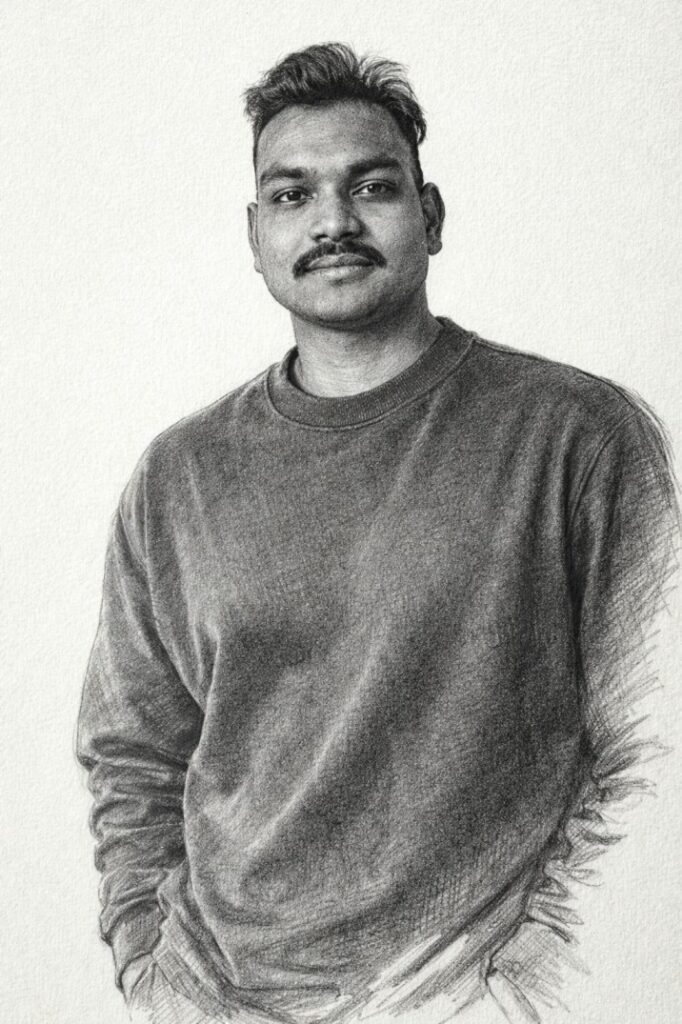
इस prompt से बनने वाली image में ये features होंगे:
- Same face identity lock portrait
- Professional pencil sketch drawing style
- Graphite pencil shading techniques
- Visible hand-drawn pencil strokes
- Artistic cross-hatching shadow detail
- Textured sketchbook paper background
- Fine art illustration style
- Ultra detailed high resolution portrait
यह style artistic portraits, profile photos और creative AI artwork के लिए बहुत popular है।
🔴Prompt in English 👇
(Use exact uploaded reference face, zero modification) FACE LOCK — ZERO MODIFICATION POLICY Highly detailed artistic pencil sketch portrait of the young man with the exact reference face, wearing a simple oversized sweatshirt. The artwork looks like it was drawn by a professional artist using graphite pencils on textured white paper. Visible pencil strokes, shading gradients, cross-hatching technique for shadows, realistic hand-drawn style. The sweatshirt fabric folds are carefully illustrated with sketch lines and soft shading. Clean white sketchbook background with slight paper grain texture. Ultra detailed pencil illustration, realistic portrait sketch, fine art drawing style, dramatic shading, high resolution.
🔴Prompt in Hindi 👇
अपलोड की गई reference image के चेहरे को बिल्कुल वैसा ही रखें और उसमें किसी भी प्रकार का बदलाव न करें। चेहरे की बनावट, त्वचा की बनावट, स्किन पोर्स, मूंछ और चेहरे के प्राकृतिक features पूरी तरह सुरक्षित रहने चाहिए और किसी भी प्रकार का beauty filter या face reshaping नहीं होना चाहिए। यह एक artistic pencil sketch portrait है जिसमें वही reference face दिखाई देता है। व्यक्ति ने simple oversized sweatshirt पहना हुआ है। यह artwork ऐसा दिखाई देता है जैसे किसी professional artist ने graphite pencil से textured white paper पर बनाया हो। drawing में साफ दिखाई देने वाले pencil strokes, shading gradients और cross-hatching technique से shadows बनाए गए हैं जिससे portrait बहुत realistic hand-drawn style में दिखाई देता है। sweatshirt के fabric folds को sketch lines और soft shading के साथ carefully illustrate किया गया है। background clean white sketchbook paper है जिसमें हल्का paper grain texture दिखाई देता है। पूरी image ultra detailed pencil illustration style में है और dramatic shading के साथ high resolution fine art drawing जैसा look देती है।
📌 ChatGPT में Prompt कैसे Use करें?
Step 1
ChatGPT खोलें और Image Generation option चुनें।
Step 2
अपनी reference photo upload करें।
Step 3
ऊपर दिया गया prompt copy करके paste करें।
Step 4
Generate पर क्लिक करें और AI pencil sketch portrait तैयार हो जाएगा।
अगर आप और artistic result चाहते हैं तो prompt के अंत में यह भी जोड़ सकते हैं: ultra HD, graphite drawing style, fine art illustration.
🔥 Expert Tips – Image को और Realistic कैसे बनाएं
✔ Face lock instructions जरूर लिखें
✔ Pencil texture detail mention करें
✔ Shading technique describe करें
✔ Paper texture add करें
✔ High resolution quality लिखें
❌ Common Mistakes जो लोग करते हैं
❌ Face identity instructions न लिखना
❌ Drawing style mention न करना
❌ Shading technique describe न करना
❌ Background detail न देना
❌ Prompt बहुत छोटा लिख देना
AI उतना ही अच्छा result देगा जितनी detail आप prompt में देंगे।
🎬 Final Output कैसा मिलेगा?
आपको मिलेगा:
- Same face realistic pencil sketch portrait
- Professional graphite drawing style
- Artistic shading और cross-hatching detail
- Sketchbook paper background
- Creative fine art portrait look
- Ultra detailed AI generated artwork
Conclusion
अगर आप ChatGPT की मदद से artistic pencil sketch portraits बनाना चाहते हैं तो detailed prompt लिखना बहुत जरूरी है। जब आप face identity, drawing style, shading techniques और paper texture को सही तरीके से लिखते हैं तो AI एक ultra realistic hand-drawn portrait generate करता है।