
हर फोटो को बहुत ज्यादा formal बनाना जरूरी नहीं होता। कई बार smart-casual professional portraits ज्यादा natural और attractive लगते हैं। ऐसी photos LinkedIn, Instagram profile, portfolio और personal branding के लिए बहुत popular हैं।
AI image generation tools की मदद से अब आप अपनी फोटो को बिल्कुल smart-casual professional portrait में बदल सकते हैं।
लेकिन अक्सर AI image बनाते समय एक समस्या आती है — चेहरा बदल जाता है। इसलिए अगर आप चाहते हैं कि image में आपका चेहरा बिल्कुल वही रहे, तो Face Lock prompt technique का उपयोग करना जरूरी होता है।
इस guide में हम सीखेंगे कि ChatGPT की मदद से smart casual professional portrait कैसे बनाया जाता है।
🎯 हम कैसी Image बनाएंगे?
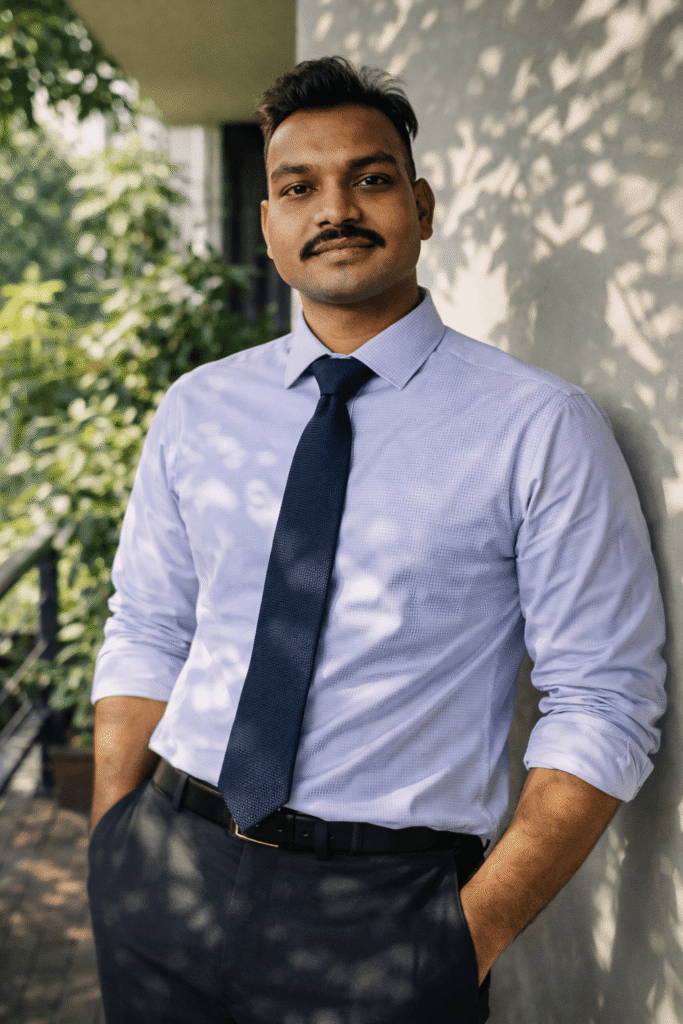
इस prompt से बनने वाली image में ये features होंगे:
- Same face identity lock portrait
- Smart casual professional outfit
- Garden facing office environment
- Natural sunlight photography
- Organic leaf shadow lighting effect
- Clean aesthetic background
- Professional lifestyle portrait look
- Ultra realistic AI portrait
यह style LinkedIn profile photos, personal branding portraits और modern professional images के लिए बहुत popular है।
🔴Prompt in English 👇
(Use exact uploaded reference face, zero modification) FACE LOCK — ZERO MODIFICATION POLICY The Smart-Casual Pro (No Jacket): (FACE LOCK POLICY) A waist-up portrait of the man with the exact reference face. He is wearing a blue and white micro-checkered shirt with a solid navy blue knit tie. Standing in a garden-facing office veranda. Soft green aesthetic, natural sunlight filtering through leaves, creating organic shadow patterns on the white wall and subject.
🔴Prompt in Hindi 👇
अपलोड की गई reference image के चेहरे को बिल्कुल वैसा ही रखें और उसमें किसी भी प्रकार का बदलाव न करें। चेहरे की बनावट, त्वचा की बनावट, स्किन पोर्स, मूंछ और चेहरे के प्राकृतिक features पूरी तरह सुरक्षित रहने चाहिए और किसी भी प्रकार का beauty filter या face reshaping नहीं होना चाहिए। यह waist-up portrait composition है जिसमें वही reference face दिखाई देता है। व्यक्ति एक garden-facing office veranda में खड़ा है जहाँ आसपास हल्का green aesthetic दिखाई देता है। उसने blue और white micro-checkered shirt पहनी है और साथ में solid navy blue knit tie पहनी हुई है जिससे smart casual professional look बनता है। पेड़ों की पत्तियों से छनकर आती हुई natural sunlight दीवार और subject पर organic shadow patterns बनाती है जिससे image बहुत natural और aesthetic दिखाई देती है। background clean white wall है और पूरी image natural daylight lifestyle photography style में दिखाई देती
📌 ChatGPT में Prompt कैसे Use करें?
Step 1
ChatGPT खोलें और Image Generation option चुनें।
Step 2
अपनी reference photo upload करें।
Step 3
ऊपर दिया गया prompt copy करके paste करें।
Step 4
Generate पर क्लिक करें और AI smart casual portrait तैयार हो जाएगा।
अगर आप और cinematic result चाहते हैं तो prompt के अंत में यह भी जोड़ सकते हैं: ultra HD, natural daylight portrait photography, lifestyle portrait.
🔥 Expert Tips – Image को और Realistic कैसे बनाएं
✔ Face lock instructions जरूर लिखें
✔ Natural environment describe करें
✔ Outfit detail clearly mention करें
✔ Natural lighting detail लिखें
✔ High resolution quality add करें
❌ Common Mistakes जो लोग करते हैं
❌ Face identity instructions न लिखना
❌ Environment describe न करना
❌ Outfit detail mention न करना
❌ Lighting detail न देना
❌ Prompt बहुत छोटा लिख देना
AI उतना ही अच्छा result देगा जितनी detail आप prompt में देंगे।
🎬 Final Output कैसा मिलेगा?
आपको मिलेगा:
- Same face smart casual portrait
- Garden office aesthetic background
- Natural sunlight lighting effect
- Professional lifestyle portrait look
- Social media ready image
- Ultra realistic AI generated portrait
Conclusion
अगर आप ChatGPT की मदद से smart casual professional portraits बनाना चाहते हैं तो detailed prompt लिखना बहुत जरूरी है। जब आप face identity, environment, lighting और outfit details को सही तरीके से लिखते हैं तो AI एक ultra realistic lifestyle portrait generate करता है।